Posts

DocuSign Integration With Salesforce

Image
DOCUSIGN Sign or send documents for signature directly from salesforce. In a single click we can send documents for e-signature from any object . Steps To Create DocuSign Developer Account : Step 1 :   Go to the following url to create DocuSign developer account                   https://www.docusign.com/developer-center                                                                                                OR                   https://www.docusign.com/ Step 2 :If you click on  first link , you will get                Select CREATE SANDBOX or GET A FREE DEV ACCOUNT  ...

Render a Visualforce Page as a PDF File

Image
Render a Visualforce Page as a PDF File You can generate a downloadable, printable PDF file of a Visualforce page using the PDF rendering service. Convert a page to PDF by changing the  <apex:page >  tag. <apex:page renderAs="pdf"> Example : Apex Class: public class WebAttachMentApexClass {     public List<Contact> cs{get; set;}     public WebAttachMentApexClass()     {         cs = new List<Contact>();         for (Contact c : [Select id, Name from Contact])         {                    cs.add(c);         }     } } VisualForce Pge: <apex:page controller="WebAttachMentApexClass" showHeader="false" renderAs="pdf">     <apex:pageBlock title="Export Results" >         <table border="1"...

ForceDroid Native App

Image
FORCEDROID NATIVE APP A forcedroid native app is used to perform the basic functionality. Using this app we can fetch accounts and contacts which we have in our org. Required Softwares : JDK 1.8, Node.js(latest version), Mobile SDK (Android)(latest version), Forcedroid Package(  npm install -g forcedroid ), Git(latest version). ↳After installation of mobile SDK , click on android AVD      An Android Virtual Device(AVD)  works with the emulator to provide a virtual device-specific environment in which to install and run Android apps. -->At the command prompt, change to the directory where you want to store your project,then type:         Step 1:       forcedroid create         Step 2: Select which type of app you want to create.select Native .                Step 3 :Enter Application type:   native Application name:   MyT...

Difference Between Clint Side Controller And Server Side Controller Lightning Components

DIFFERENCE BETWEEN CLINT SIDE CONTROLLER AND SERVER SIDE CONTROLLER LIGHTNING COMPONENTS Server Side Components : JS Controller : doInit: function(component, event, helper) {        var page = component.get("v.page") || 1;         var recordToDisply = component.find("recordSize").get("v.value");         helper.getAccounts(component, page, recordToDisply, component.get('v.selectedTabsoft'), component.get("v.isAsc"));       },       previousPage: function(component, event, helper) {         var recordToDisply = component.find("recordSize").get("v.value");         component.set("v.page", component.get("v.page") - 1);        helper.getAccounts(component, component.get("v.page"), recordToDisply,component.get('v.selectedTabsoft'), component.get("v.isAsc"));       },       gotoFirs...

Pagination Of Account Using Server Side Sorting On Lightning Component

Image
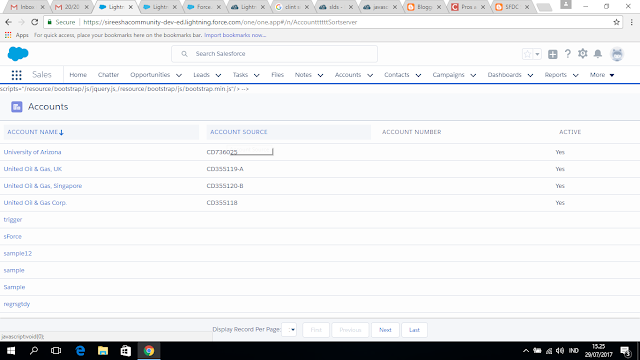
PAGINATION OF ACCOUNT USING SERVER SIDE SORTING ON LIGHTNING COMPONENT Component: <aura:component controller="AccountServersidesorting" implements="force:appHostable,flexipage:availableForAllPageTypes,flexipage:availableForRecordHome,force:hasRecordId,forceCommunity:availableForAllPageTypes"                    access="global">       scripts="/resource/bootstrap/js/jquery.js,/resource/bootstrap/js/bootstrap.min.js"/>  -->     <aura:attribute name="arrowDirection" type="string" default="arrowup" description="Use for change arrow sign direction on header based on click"/>       <aura:attribute name="isAsc" type="boolean" default="true" description="boolean flag for pass sorting condition to apex class"/>        <aura:attribute name="selectedTabsoft" type="string" default="Name" description=...

Pagination Of Contacts With Clint Side Controller Sorting Functionality On Lightning Component

Image
PAGINATION OF CONTACTS WITH CLINT SIDE SORTING FUNCTIONALITY ON LIGHTNING COMPONENT What is clint side sorting :In clint side sorting we will implement sorting functionality in clint side JS controller without using server side controller(Apex Class). i.e we use server side controller only to get the records from the Object .  The remaining functionality i.e pagination , custom buttons(First,Previous,Next,Last) and sorting implement at clint side. PROS : 1. In sales force one of the governer limits is total number of SOQL queries are 100. Using server side pagination each time on button click(First ,Previous,Next ,Last ) we call Soql query then we will get the error if we exceed the limit.Using clint side pagination each time no need call soql query. CONS :   1. Using clint side sorting we can not sot relational fields like Account.Name field in contacts. 2.If the number of records are increased , loading of records on custom button become slow....